Direct Modeling vs. Parametric: Which Should You Use?
Watch the Video!
Need a video to help you through this process? Then check out the video on youtube!
If you’ve spent any time in Siemens NX, you’ve likely encountered the frustration of a "broken" history tree. One wrong move on an early feature can send a cascade of red error icons down your Navigator.
But what if you could just grab a face and move it without worrying about constraints?
In our latest video, we dive deep into the showdown between Parametric (History-Based) Modeling and Direct Modeling (Synchronous Technology). Here is a breakdown of what you need to know to choose the right tool for the job.
1. Parametric Modeling
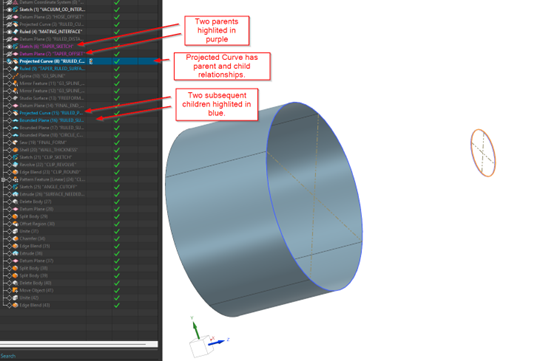
Parametric modeling is the traditional "History-Based" approach. Every sketch, extrude, and hole is recorded in a sequence.
The Pros:
Design Intent: It’s perfect for parts with strict dimensions and relationships. Consistent parent-child relationships can lead to effortless updates.
Automation: By changing a single expression or dimension at the start of the tree, the entire model updates automatically.
The Cons:
Rigidity: If the history tree gets too complex, making a small change can cause features downstream to fail.
Learning Curve: You have to plan your "build strategy" before you even start sketching.
2. Direct Modeling
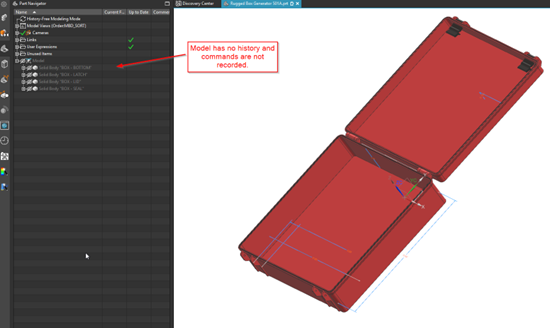
Direct modeling—often referred to in NX as Synchronous Technology—allows you to interact with the geometry directly. You aren't editing a sketch; you are moving, offsetting, or deleting faces.
The Pros:
Speed: It is incredibly fast for late-stage design changes. Want to move a rib 5mm to the left? Just select it and move it.
Working with "Dumb" Geometry: If you’ve imported a STEP or IGES file from another CAD system, there is no history tree to edit. Direct modeling allows you to modify these files as if you created them yourself.
The Cons:
Lack of Constraints: Because it doesn't rely on a history tree, it’s harder to maintain strict "if-this-then-that" relationships across the entire model.
Skeleton Models Fail: If your company relies on skeleton models, this approach can be catastrophic and can lead to failure of parts.
When Should You Use Which?
The truth is, the best designers don't choose just one; they use a Hybrid Approach.
Use Parametric when you are starting a design from scratch where dimensions are known and logic is critical.
Use Direct Modeling when you are doing "What If" iterations, cleaning up complex geometry for CAE/FEA analysis, or modifying imported supplier data.
Choosing between parametric and direct modeling shapes how your entire product structure behaves. Continue mastering both geometry creation and downstream assembly control with our advanced design guides:
The Foundation of Parametric Design: If you are building a highly flexible parametric model, ensure your geometry stays stable by mastering constraints with our guide on Sketches in Siemens NX.
Manage Your Resulting Components: Once your models are built—whether using parametric trees or direct modeling modifications—control how they interact across moving mechanisms using Siemens NX Arrangements vs. Reference Sets.
Standard software tutorials only go so far when facing unique, real-world production bottlenecks. If your design team is struggling with workflow inefficiencies, modeling errors, or assembly instability, we can help.
At JIVE Engineering, we provide on-site Siemens NX Corporate Training customized entirely around your company's actual production files, native geometry, and internal workflows. We help your design team transition from basic button-clicking to mastering robust, failure-proof top-down modeling strategies.
Explore Our Custom NX Training Programs or Contact Our Team today to schedule a workflow audit.